Build Resilient Agentic AI Applications
Aivo SDK brings autonomous reasoning, multi-agent collaboration, reactive Jetpack Compose streaming, and robust human confirmation gates to Android, iOS, and JVM.
📦 Step-by-Step Installation & Setup
Aivo SDK is built natively for Kotlin Multiplatform (KMP) and can be integrated into Android applications, KMP shared modules, iOS applications, or server-side JVM runtimes (e.g., Ktor, Spring Boot).
Step 1: Configure Repositories
In your root settings.gradle.kts, ensure mavenCentral() and google()
are declared:
dependencyResolutionManagement {
    repositories {
        google()
        mavenCentral()
    }
}
Step 2: Add Dependencies
Choose your project architecture below to view the optimized dependency configuration:
// app/build.gradle.kts
dependencies {
    // 🤖 Aivo SDK Universal Multiplatform Engine (Android API 24+)
    implementation("io.github.abdallah-elsobky:aivo-sdk:1.0.1")

    // 🧪 Optional Test Doubles (FakeLlmProvider, InMemoryTelemetry)
    testImplementation("io.github.abdallah-elsobky:sdk-testing:1.0.1")

    // Coroutines & Serialization
    implementation("org.jetbrains.kotlinx:kotlinx-coroutines-android:1.8.1")
    implementation("org.jetbrains.kotlinx:kotlinx-serialization-json:1.6.3")
}aivo-sdk automatically includes sdk-runtime, sdk-core, sdk-transport, and all official providers (Gemini, Ollama, OpenAI) into your compilation classpath.
# gradle/libs.versions.toml
[versions]
aivo = "1.0.1"

[libraries]
aivo-sdk = { module = "io.github.abdallah-elsobky:aivo-sdk", version.ref = "aivo" }
aivo-sdk-runtime = { module = "io.github.abdallah-elsobky:sdk-runtime", version.ref = "aivo" }
aivo-sdk-core = { module = "io.github.abdallah-elsobky:sdk-core", version.ref = "aivo" }
aivo-sdk-transport = { module = "io.github.abdallah-elsobky:sdk-transport", version.ref = "aivo" }
aivo-sdk-middleware = { module = "io.github.abdallah-elsobky:sdk-middleware", version.ref = "aivo" }
aivo-sdk-agent-config = { module = "io.github.abdallah-elsobky:sdk-agent-config", version.ref = "aivo" }
aivo-sdk-provider-ollama = { module = "io.github.abdallah-elsobky:sdk-provider-ollama", version.ref = "aivo" }
aivo-sdk-provider-gemini = { module = "io.github.abdallah-elsobky:sdk-provider-gemini", version.ref = "aivo" }
aivo-sdk-provider-openai = { module = "io.github.abdallah-elsobky:sdk-provider-openai-compatible", version.ref = "aivo" }

[bundles]
aivo-sdk = [
    "aivo-sdk",
    "aivo-sdk-core",
    "aivo-sdk-runtime",
    "aivo-sdk-transport",
    "aivo-sdk-middleware",
    "aivo-sdk-agent-config",
    "aivo-sdk-provider-ollama",
    "aivo-sdk-provider-gemini",
    "aivo-sdk-provider-openai"
]
In Kotlin Multiplatform, Gradle's metadata compiler generates target-specific klibs for each platform (Android, iOS Arm64, Simulator, JVM). Declaring the aivo-sdk bundle gives you a single clean line (implementation(libs.bundles.aivo.sdk)) in your build script while guaranteeing complete symbol resolution for AgentDefinition, providers, and transport across all targets without missing class or classpath errors.
Step 3: Acquiring & Storing API Keys Securely
Before making calls, acquire your API credentials from your preferred provider:
- Ollama Cloud: Get your key from ollama.com. (Preconfigured Cloud Endpoint:
https://ollama.com/api/chat). - Google Gemini: Generate a free API key at Google AI Studio.
- OpenRouter: Generate an API key at openrouter.ai to access 200+ models.
local.properties (which is ignored by .gitignore):
OLLAMA_API_KEY=your_key_here
GEMINI_API_KEY=AIzaSy...
Then inject them into BuildConfig in app/build.gradle.kts:
android {
    defaultConfig {
        val properties = java.util.Properties()
        val localPropertiesFile = rootProject.file("local.properties")
        if (localPropertiesFile.exists()) {
            properties.load(localPropertiesFile.inputStream())
        }
        buildConfigField("String", "OLLAMA_API_KEY", "\"${properties.getProperty("OLLAMA_API_KEY", "")}\"")
        buildConfigField("String", "GEMINI_API_KEY", "\"${properties.getProperty("GEMINI_API_KEY", "")}\"")
    }
    buildFeatures {
        buildConfig = true
    }
}
⚡ Interactive SDK Configurator
Choose your provider, model, and capabilities below to dynamically generate the exact Kotlin initialization code for your project:
// Generating...🚀 Quick Start: 3 Levels of DX
Aivo SDK adapts cleanly to your application requirements with three distinct levels of Developer Experience (DX):
Level 1: Raw LLM (Chat & Token Streaming)
val aivo = AivoSdk.create(
    provider = AivoProvider.OLLAMA,
    model    = OllamaModel.GPT_OSS_120B.modelId,
    apiKey   = BuildConfig.OLLAMA_API_KEY
)

// One-shot completion
val response = aivo.chat("Explain coroutines in 2 sentences")
println(response.text)

// Token-by-token streaming Flow
aivo.stream("Explain state machines")
    .collect { event ->
        if (event is AgentEvent.Delta) print(event.text)
    }
🌐 Providers & Strongly-Typed Model Catalogs
Say goodbye to magic strings and typos. Aivo SDK features typed model enums for all supported providers while still supporting custom endpoints and custom private model identifiers:
| Provider | Typed Catalog Enum | Default Cloud Endpoint | Custom Support |
|---|---|---|---|
| Ollama Cloud |
OllamaModel.GPT_OSS_120B.modelIdOllamaModel.LLAMA_3_3_70B.modelIdOllamaModel.MISTRAL_SMALL_24B.modelId
|
https://ollama.com/api/chat(predefined in SDK) |
✅ Yes (custom string ID & private base URL) |
| Google Gemini |
GeminiModel.GEMINI_2_5_FLASH.modelIdGeminiModel.GEMINI_2_5_PRO.modelId
|
/v1beta/interactions |
✅ Yes (custom model names) |
| OpenRouter |
OpenRouterModel.LING_3_0_FLASH_SANTE_FREE.modelIdOpenRouterModel.CLAUDE_3_5_SONNET.modelId
|
https://openrouter.ai/api/v1 |
✅ Yes (all 200+ OpenRouter IDs) |
Using Custom Endpoints or Private Cluster Models
Need to point to an on-premise Ollama cluster, vLLM instance, or fine-tuned company model? You can override the base URL and pass any custom model string:
val aivo = AivoSdk {
    providers {
        ollama("private-cluster") {
            // Optional: specify custom internal URL
            baseUrl("https://internal-llm.company.com/api/chat")
            apiKey(BuildConfig.CUSTOM_LLM_KEY)
        }
    }
    // Pass custom fine-tuned model name as string
    defaultModel("custom-llama3-fine-tuned:latest")
}
🛠️ Creating Tools & Safety Confirmation Gates
Tools empower your agents to take real-world actions: fetch weather APIs, query Room/SQLite databases, trigger device sensors, or execute transactions.
Step 1: Anatomy of a Tool
Use the type-safe tool("name", "description") { ... } DSL to define tools with strict parameter
schemas:
val getWeatherTool = tool("get_weather", "Fetches live weather conditions for a given city") {
    // 1. Declare JSON schema parameter constraints
    parameters {
        string("city", "The city name", required = true, minLength = 2)
        string("unit", "Temperature unit", required = false, enum = listOf("celsius", "fahrenheit"))
        boolean("forecast", "Include 3-day forecast", required = false)
    }

    // 2. Execute business logic with type-safe extractors
    execute { args ->
        val city = args.string("city")
        val unit = args.stringOrNull("unit") ?: "celsius"
        val isForecast = args.booleanOrNull("forecast") ?: false

        // Call your real backend or network service
        """{"city": "$city", "temp": 24, "unit": "$unit", "condition": "Sunny"}"""
    }
}
Step 2: Safety & Human Confirmation Gates (High-Risk Tools)
When a tool performs sensitive mutations (e.g., spending money, deleting files, sending emails), you must protect against autonomous hallucinations using Human Confirmation Gates:
val transferFundsTool = tool("transfer_funds", "Transfers funds between bank accounts") {
    riskLevel = RiskLevel.HIGH
    requireConfirmation = true  // Runtime pauses and emits RequiresConfirmation event

    parameters {
        string("fromAccount", "Debiting account", required = true)
        string("toAccount", "Crediting account", required = true)
        double("amount", "Transfer amount in USD", required = true, minimum = 1.0)
    }

    execute { args ->
        val from = args.string("fromAccount")
        val to = args.string("toAccount")
        val amount = args.double("amount")
        bankApi.transfer(from, to, amount)
        "Successfully transferred $$amount from $from to $to"
    }
}
When the LLM invokes this tool, the SDK execution loop pauses and emits
AgentEvent.RequiresConfirmation containing the tool name, arguments, and a unique
toolCallId. The app UI prompts the user (e.g. via biometric dialog), and then confirms or
rejects:
// When user taps "Approve" in Compose Dialog:
runtime.confirm(toolCallId = event.toolCallId, approved = true)

// Or if user rejects:
runtime.confirm(toolCallId = event.toolCallId, approved = false, reason = "User cancelled transfer")
🤖 Creating Single Agents & Giving Them Tools
An Agent combines a persona/role, instructions (system prompt), scoped tools, and execution limits.
Step 1: Programmatic Agent in Kotlin DSL
Register tools globally, then scope specific tools to your agent:
val aivo = AivoSdk {
    providers {
        ollama(AivoProvider.OLLAMA.id) { apiKey(BuildConfig.OLLAMA_API_KEY) }
    }
    defaultModel(OllamaModel.GPT_OSS_120B)

    // 1. Register available tools
    tools {
        +getWeatherTool
        +transferFundsTool
    }

    // 2. Define the Agent and assign scoped tools
    agents {
        define("concierge") {
            name = "Personal Concierge"
            systemPrompt = """
                You are a helpful mobile concierge.
                Customer Name: {{user_name}}
                Always check weather before suggesting outdoor activities.
            """.trimIndent()

            // Give specific tools to this agent
            tools("get_weather")

            // Set maximum execution turns to prevent infinite loops
            maxSteps = 10
        }
    }
    entryAgent("concierge")
}

// 3. Execute with dynamic prompt variables
val response = aivo.chat(
    message   = "What should I wear today in Cairo?",
    variables = mapOf("user_name" to "Abdallah")
)
println(response.text)
Step 2: Declarative Agents (Markdown Frontmatter & JSON Catalogs)
To decouple prompt engineering from code updates, you can store agent definitions as Markdown files in your assets:
---
name: Support Specialist
role: assistant
provider: ollama
model: gpt-oss-120b
tools: [order_status, refund_tool]
maxSteps: 8
---
You are a tier-1 customer support agent.
Current customer: {{user_name}}.
Always verify the order ID before processing any refund. Be courteous and concise.
Load the Markdown catalog directly in Kotlin:
val agentDef = AgentLoader.fromMarkdown(markdownFileContent)
val runtime = AgentRuntime.create(agentDef) {
    apiKey(BuildConfig.OLLAMA_API_KEY)
}
👥 Creating Multi-Agent Teams & The Supervisor Pattern
Monolithic prompts struggle with complex multi-step workflows. Multi-agent teams solve this through specialization of labor:
Full Multi-Agent Team Setup with Blackboard State
Agents share structured findings without string collisions using strongly-typed
StateKey<T>:
// 1. Define strongly-typed shared keys for inter-agent communication
object TeamKeys {
    val ResearchFindings = StateKey.string("research_findings")
    val DraftSummary = StateKey.string("draft_summary")
}

// 2. Build the Multi-Agent Team
val marketReportTeam = team("MarketAnalysisTeam") {

    // Supervisor coordinates the workflow
    supervisor {
        name = "Lead Coordinator"
        systemPrompt = "Analyze the user prompt. First delegate research to 'researcher'. Then delegate reporting to 'writer'."
        model(AivoProvider.OLLAMA, OllamaModel.GPT_OSS_120B.modelId)
    }

    // Specialist 1: Researcher (has web search tool)
    agent("researcher") {
        name = "Market Researcher"
        systemPrompt = "Extract key verified industry statistics and write notes into the blackboard."
        tools("web_search")
        model(AivoProvider.OLLAMA, OllamaModel.GPT_OSS_120B.modelId)
    }

    // Specialist 2: Writer (synthesizes findings)
    agent("writer") {
        name = "Executive Writer"
        systemPrompt = "Read research findings and format a bulleted executive briefing."
        model(AivoProvider.OLLAMA, OllamaModel.GPT_OSS_120B.modelId)
    }
}

// 3. Execute the collaborative workflow
val finalBriefing = marketReportTeam.execute("Analyze renewable energy battery storage growth in 2026")
println(finalBriefing.text)
🌊 Reactive Streaming in Jetpack Compose & iOS
Provide instant feedback to users by streaming tokens as they generate, showing tool progress chips, and handling confirmation dialogs.
1. Jetpack Compose ViewModel
data class MessageUi(val sender: String, val text: String, val isToolExecuting: Boolean = false)

class ChatViewModel(private val aivo: AivoSdk) : ViewModel() {
    private val _messages = MutableStateFlow>(emptyList())
    val messages: StateFlow> = _messages.asStateFlow()

    // Confirmation gate state for UI Dialog
    var pendingConfirmation by mutableStateOf(null)
        private set

    fun sendMessage(prompt: String) {
        _messages.update { it + MessageUi(sender = "User", text = prompt) }
        _messages.update { it + MessageUi(sender = "Assistant", text = "") }

        viewModelScope.launch {
            aivo.stream(prompt).collect { event ->
                when (event) {
                    is AgentEvent.Delta -> {
                        _messages.update { list ->
                            val last = list.last()
                            list.dropLast(1) + last.copy(text = last.text + event.text)
                        }
                    }
                    is AgentEvent.ToolStarted -> {
                        _messages.update { list ->
                            val last = list.last()
                            list.dropLast(1) + last.copy(isToolExecuting = true)
                        }
                    }
                    is AgentEvent.ToolCompleted -> {
                        _messages.update { list ->
                            val last = list.last()
                            list.dropLast(1) + last.copy(isToolExecuting = false)
                        }
                    }
                    is AgentEvent.RequiresConfirmation -> {
                        pendingConfirmation = event // Triggers Compose alert dialog
                    }
                    is AgentEvent.Completed -> { /* Stream finished */ }
                    is AgentEvent.Error -> { /* Handle error */ }
                    else -> Unit
                }
            }
        }
    }

    fun handleConfirmation(approved: Boolean) {
        val event = pendingConfirmation ?: return
        aivo.confirm(event.toolCallId, approved)
        pendingConfirmation = null
    }
}
2. Jetpack Compose UI Screen
@Composable
fun ChatScreen(viewModel: ChatViewModel = viewModel()) {
    val messages by viewModel.messages.collectAsState()
    var input by remember { mutableStateOf("") }

    // Human Confirmation Dialog Gate
    viewModel.pendingConfirmation?.let { conf ->
        AlertDialog(
            onDismissRequest = { viewModel.handleConfirmation(false) },
            title = { Text("Approve Action: ${conf.toolName}") },
            text = { Text("Parameters: ${conf.arguments}") },
            confirmButton = {
                Button(onClick = { viewModel.handleConfirmation(true) }) { Text("Approve") }
            },
            dismissButton = {
                OutlinedButton(onClick = { viewModel.handleConfirmation(false) }) { Text("Reject") }
            }
        )
    }

    Column(modifier = Modifier.fillMaxSize().padding(16.dp)) {
        LazyColumn(modifier = Modifier.weight(1f)) {
            items(messages) { msg ->
                ChatBubble(msg)
            }
        }
        Row(modifier = Modifier.fillMaxWidth()) {
            TextField(
                value = input,
                onValueChange = { input = it },
                modifier = Modifier.weight(1f),
                placeholder = { Text("Ask Aivo...") }
            )
            Button(onClick = {
                viewModel.sendMessage(input)
                input = ""
            }) { Text("Send") }
        }
    }
}
🧠 Persistent Memory & Context Strategies
Control how conversation history is persisted across mobile sessions and prevent model context limit overflows:
maxMessages = 20)
while always preserving the system instructions.maxTokens = 8_000) is reached.val aivo = AivoSdk {
// ...
memory {
// Option A: In-memory sliding window
slidingWindow(maxMessages = 20)
// Option B: Token budget with character heuristic
tokenBudget(maxTokens = 8_000, estimator = CharCountEstimator)
}
}🛡️ Resilience, Guardrails & Security
Production AI must be fortified against unstable connections, runaway execution costs, and data leaks:
- Exponential Backoff with Jitter: Automatically retries
429 Rate Limitand503 Server Unavailableerrors with exponential delays (1s, 2s, 4s). - Strict Execution Bounds: Every agent has a hard limit (e.g.
maxSteps = 15). If an agent exceeds this, it terminates cleanly instead of burning tokens indefinitely. - Secret Redaction Filter: Telemetry and logs automatically mask API keys, tokens, and credit card numbers using regex sanitization before output.
- Concurrency Mutex: Memory store operations use Kotlin Coroutine Mutexes to guarantee thread-safe state mutations across parallel agent turns.
🧪 Deterministic Offline Unit Testing
Unit-test your ViewModels, tools, and multi-agent loops deterministically without network calls and with zero API token expense:
@Test
fun testViewModelStreamsDeltas() = runTest {
    // Mock provider with deterministic streaming chunks
    val fakeLlm = FakeLlmProvider().apply {
        enqueueStreaming("Hello", " from", " Aivo!")
    }

    val viewModel = ChatViewModel(aivo = AivoSdk.createWithProvider(fakeLlm))
    viewModel.sendMessage("Hi")

    assertEquals("Hello from Aivo!", viewModel.messages.value.last().text)
}
🔄 Custom Reasoning Loops & Roles
Build specialized multi-agent architectures using the 3 core nouns: Agent (identity), Tool (action), and Loop (algorithm):
// Type-safe roles and blackboard keys
val analyst = AgentRole.ANALYST
val ReviewNotesKey = StateKey.string("review_notes")

// Sequential pipeline loop: Research -> Review -> Finalize
val pipeline = SequenceLoop(
    agents = listOf(researcherAgent, reviewerAgent, writerAgent),
    state = BlackboardState()
)

val pipelineResult = pipeline.run("Analyze Q3 Financials")
println(pipelineResult.finalOutput)
🌟 Full Master Example: All Features Together
Here is a complete, production-grade Android application setup demonstrating how Ollama Cloud, Persistent Memory, Custom Tools, Human Confirmation Gates, Multi-Agent Teams, and Jetpack Compose Streaming work together harmoniously:
package com.example.aivo

import androidx.lifecycle.ViewModel
import androidx.lifecycle.viewModelScope
import com.aivo.sdk.AivoSdk
import com.aivo.sdk.AivoProvider
import com.aivo.sdk.core.model.*
import com.aivo.sdk.provider.ollama.OllamaModel
import com.aivo.sdk.runtime.tool.tool
import com.aivo.sdk.runtime.agent.team
import kotlinx.coroutines.flow.*
import kotlinx.coroutines.launch

// 1. Define High-Risk Mutation Tool with Confirmation Gate
val bookFlightTool = tool("book_flight", "Books a verified airline ticket") {
    riskLevel = RiskLevel.HIGH
    requireConfirmation = true

    parameters {
        string("destination", "3-letter airport code", required = true)
        string("date", "Departure date YYYY-MM-DD", required = true)
        double("maxPrice", "Maximum ticket price in USD", required = true)
    }

    execute { args ->
        val dest = args.string("destination")
        val date = args.string("date")
        val price = args.double("maxPrice")
        """{"status": "CONFIRMED", "ticket": "TK-9821", "dest": "$dest", "cost": $$price}"""
    }
}

// 2. Define Multi-Agent Travel Team
val travelTeam = team("TravelTeam") {
    supervisor {
        name = "Travel Concierge"
        systemPrompt = "Deconstruct travel requests. Delegate flight booking to 'booking_agent'."
        model(AivoProvider.OLLAMA, OllamaModel.GPT_OSS_120B.modelId)
    }

    agent("booking_agent") {
        name = "Flight Booking Specialist"
        systemPrompt = "Find flight availability and book tickets using 'book_flight'."
        tools("book_flight")
        model(AivoProvider.OLLAMA, OllamaModel.GPT_OSS_120B.modelId)
        maxSteps = 6
    }
}

// 3. Configure Aivo SDK with Cloud Provider and Sliding Window Memory
val aivo = AivoSdk {
    providers {
        ollama(AivoProvider.OLLAMA.id) {
            apiKey(BuildConfig.OLLAMA_API_KEY)
        }
    }
    defaultModel(OllamaModel.GPT_OSS_120B)

    tools {
        +bookFlightTool
    }

    memory {
        slidingWindow(maxMessages = 20)
    }
}

// 4. Reactive Jetpack Compose ViewModel
class TravelViewModel : ViewModel() {
    private val _messages = MutableStateFlow<List<String>>(emptyList())
    val messages: StateFlow<List<String>> = _messages.asStateFlow()

    private val _pendingGate = MutableStateFlow<AgentEvent.RequiresConfirmation?>(null)
    val pendingGate: StateFlow<AgentEvent.RequiresConfirmation?> = _pendingGate.asStateFlow()

    fun bookTrip(prompt: String) {
        viewModelScope.launch {
            aivo.stream(prompt).collect { event ->
                when (event) {
                    is AgentEvent.Delta -> {
                        _messages.update { it + event.text }
                    }
                    is AgentEvent.RequiresConfirmation -> {
                        // Triggers Biometric / Dialog Confirmation in Compose UI
                        _pendingGate.value = event
                    }
                    is AgentEvent.Completed -> {
                        println("Workflow finished! Usage: \${event.usage.totalTokens} tokens")
                    }
                    is AgentEvent.Error -> {
                        println("Workflow error: \${event.error.message}")
                    }
                    else -> Unit
                }
            }
        }
    }

    fun approveAction(approved: Boolean) {
        val event = _pendingGate.value ?: return
        aivo.confirm(event.toolCallId, approved)
        _pendingGate.value = null
    }
}
📱 Production KMP Demo Application
Experience Aivo SDK in a complete, battle-tested reference application built with Kotlin Multiplatform (KMP) and Compose Multiplatform (CMP) running across Android, iOS, and Desktop from a single shared codebase.
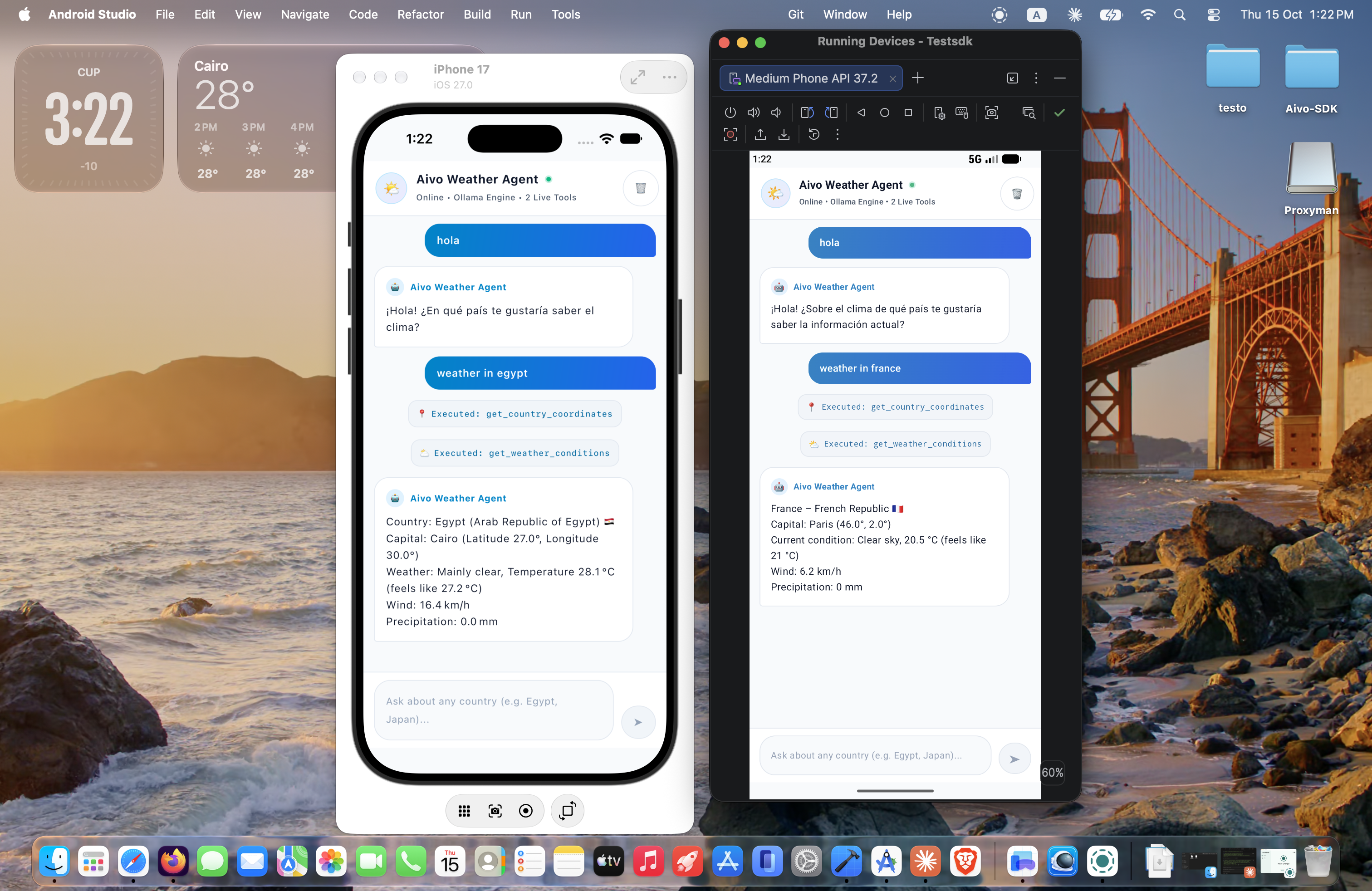
Live Compose Multiplatform chat application running Aivo SDK with streaming token rendering, tool execution, provider switching, and multi-agent coordination.
commonMain compiled for Android (API 24+), iOS (ARM64 & Simulator), and Desktop (JVM).
Flow<AgentEvent> deltas directly into Jetpack Compose StateFlow for butter-smooth word-by-word UI updates.
Clone & Run the KMP Demo App
You can clone and run the full demo application locally in minutes:
# 1. Clone the official KMP demo repository
git clone https://github.com/Abdallah-Elsobky/Test-Aivo-SDK.git
cd Test-Aivo-SDK

# 2. Run Android App
./gradlew :composeApp:installDebug

# 3. Run Desktop App
./gradlew :composeApp:run🧠 Official Agent Skills (skills.sh)
Build faster, eliminate API hallucinations, and write clean idiomatic code by equipping your AI assistant with the official Aivo SDK Agent Skills hosted on skills.sh.
Available Skills in the Aivo Ecosystem
aivo-android SkillComprehensive guide and production implementation toolkit for integrating Aivo SDK in native Android applications. Teaches the AI:
- Jetpack Compose reactive chat streaming with
Flow<AgentEvent> - Secure credential injection:
local.properties -> BuildConfig -> SecretString - Room-backed persistent conversation memory (
RoomMemoryStore) - Biometric and Dialog Human-in-the-Loop confirmation gates
- Deterministic offline unit testing with
FakeLlmProviderandInMemoryTelemetry
aivo-kmp SkillComplete architecture and production integration guide for cross-platform AI agents sharing code across Android, iOS, JVM (Desktop/Server), and Darwin:
- Version Catalog bundle
libs.bundles.aivo.sdkincommonMain - Hexagonal Clean Architecture isolating provider types from UI
- Platform-specific secret injection (Android BuildConfig, iOS Info.plist, JVM env vars)
- Compose Multiplatform Material 3 chat interfaces
- Native iOS Swift interoperability shims (
FlowAdapter,CancellableJob)
How to Install and Use the Skills
You can install both skills into any project using the official skills-cli:
# Install official Aivo SDK skills into your project
npx skills-cli add abdallah-elsobky/aivo-sdk
Quick Context Prompts for AI Coding Sessions
Paste either prompt below into your initial AI conversation (Cursor, Claude, Copilot, ChatGPT) when starting a new app:
You are an expert Android AI engineer specializing in the Aivo SDK (io.github.abdallah-elsobky:aivo-sdk:1.0.1).
Aivo SDK is a provider-agnostic, Kotlin Multiplatform AI agent framework supporting Ollama, Google Gemini, OpenRouter, and any OpenAI-compatible endpoint.
Key architectural principles:
1. Strict Hexagonal Architecture: ViewModel and UseCases interact with domain interfaces and AivoSdk. Never leak provider-specific or network types into UI layers.
2. Security: Never hardcode API keys. Use local.properties -> BuildConfig -> SecretString.
3. Streaming: Responses stream via Kotlin Flow<AgentEvent> (TextDelta, ReasoningDelta, ToolCallStarted, ToolCallExecuted, StepStarted, StepCompleted, RunCompleted, RunFailed).
4. Tool Calling: Tools are defined via tool("name", "desc") { ... } DSL with typed params, risk levels (LOW, MEDIUM, HIGH), and optional ConfirmationHandler for human-in-the-loop approval.
5. Multi-Agent: Supports supervisor delegation, SingleTurnLoop, ToolCallingLoop (ReAct), SequenceLoop, RouterLoop, and ParallelLoop.
6. Memory: In-memory or custom MemoryStore (e.g. Room Database), with keepAll(), slidingWindow(N), or tokenBudget(tokens).
7. Resilience & Errors: Built-in exponential backoff retry with jitter, timeouts, and exhaustive SdkException hierarchy.
8. Testing: Use FakeLlmProvider.scripted(...) and InMemoryTelemetry from sdk-testing (1.0.1) for offline deterministic tests.
Write clean, idiomatic Kotlin using Jetpack Compose, StateFlow, Coroutines, and MVVM/Clean Architecture.